
Last Verified: Jun 2026 | By SimOwner.net.pk Editorial Team — Pakistan’s SIM fraud documentation specialists since 2015
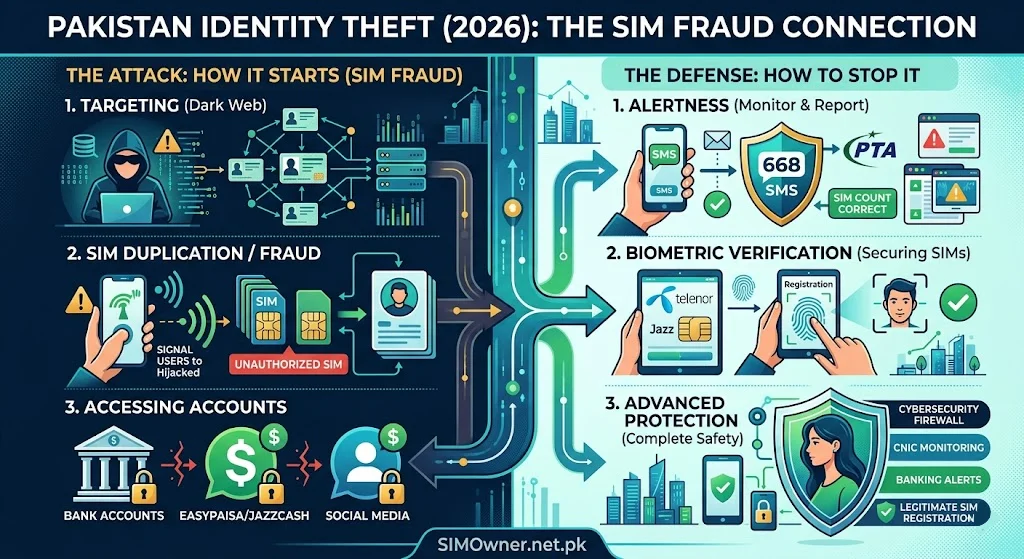
Identity theft in Pakistan does not begin with someone stealing your wallet or hacking your computer. In the vast majority of documented cases, Pakistani identity theft begins with a single piece of information — your CNIC number — and a single action — registering a SIM in your name without your knowledge.
From that one fraudulent SIM, the damage can cascade across your entire financial and legal life: unauthorized mobile wallets, fake microloans, fraudulent bank accounts, property fraud, and even criminal activities conducted in your name that you have no knowledge of until law enforcement contacts you.
This guide documents the complete Pakistani identity theft lifecycle — how it begins, how it escalates, how each stage is connected, and most importantly, how to detect and stop it at every stage. Understanding the full picture transforms you from a reactive victim into a proactive defender. Your first detection tool — a 30-second check of SIMs on your CNIC — is available right now at SimOwner.net.pk.
The Pakistan Identity Theft Lifecycle — Stage by Stage
Stage 1 — CNIC Acquisition
Every Pakistani identity theft begins with a criminal obtaining your CNIC number. The acquisition methods are documented and well-understood:
Breach database purchase: Pakistan’s telecom data breaches (2019, 2023) exposed CNIC numbers paired with phone numbers and addresses for millions of Pakistanis. Criminals purchase these datasets for as little as a few thousand rupees for targeted subsets.
Photocopy harvest: CNIC photocopies collected at franchise locations, banks, utility companies, and other entities are photographed by dishonest employees and sold to data brokers. Your CNIC photocopy — handed over routinely for dozens of legitimate purposes — has passed through potentially hundreds of hands over your lifetime.
Social engineering: Direct extraction through fraudulent calls claiming to be from NADRA, PTA, banks, or government entities — asking you to “confirm” your CNIC number for fictional purposes.
Relationship access: In cases involving former employees, domestic workers, or acquaintances — direct access to your documents or digital records.
Stage 1 defense: Minimize CNIC photocopy distribution, never “confirm” your CNIC number to unsolicited callers, and monitor your CNIC’s information footprint via SimOwner.net.pk’s CNIC tools.
Stage 2 — Unauthorized SIM Registration
With your CNIC number, the criminal’s first action is almost always to register a SIM in your name. This gives them a working phone number linked to your identity — the tool needed for everything that follows.
How it happens: As documented extensively in our guides, franchise-level biometric verification bypass — through bribery, system manipulation, or careless agents — enables SIM registration without your fingerprint.
What they gain from the SIM:
- A phone number in your name for mobile wallet registration
- A tool for receiving OTPs on services they plan to access in your name
- A communication channel that appears legitimate in system checks
- A functional identity instrument
Stage 2 detection: Monthly 668 checks — sending your CNIC to 668 — immediately reveals unauthorized SIMs. This is the earliest detection point in the identity theft lifecycle. Use the SIM database verification tools at SimOwner.net.pk for comprehensive monthly monitoring.
Stage 3 — Mobile Wallet Creation
With a SIM registered in your name, the criminal’s next step is typically opening a mobile wallet (JazzCash, Easypaisa, Nayapay) using your CNIC.
Why mobile wallets first: Mobile wallets in Pakistan can be opened with CNIC + phone number alone for basic (Level 1) accounts. No in-person visit. No additional documentation. The fraudulent SIM provides the phone number; your CNIC provides the identity. Within minutes, the criminal has a mobile wallet in your name.
What they use it for:
- Receiving fraudulent transfers (from other victims they have defrauded)
- Laundering money through your identity
- Building a Level 1 account history before attempting Level 2 KYC for higher limits
- Receiving BISP/Ehsaas-themed scam proceeds
Stage 3 detection: You receive unexpected mobile wallet notifications (confirmation SMS of account opening you did not initiate). Check JazzCash and Easypaisa registrations linked to your phone numbers. Contact wallet providers’ fraud lines if you receive account creation notifications you did not request.
Stage 4 — Fintech Microloan Applications
With a mobile wallet history established, criminals next target fintech microloan platforms — services that offer small loans (Rs. 1,000–50,000) with minimal verification:
Platforms commonly targeted: Tez Financial Services, Finja, Barwaqt, Bazaar Technologies credit products, and similar fintech lending services operating in Pakistan.
How the fraud works: The application is submitted using your CNIC and the fraudulent mobile wallet — demonstrating “financial activity” in your name. The loan is disbursed to the fraudulent wallet. The criminal withdraws the money. You are left with a loan default on your CNIC.
Stage 4 consequence: Loan defaults under your CNIC affect your creditworthiness — appearing in credit bureau records (eCIB — electronic Credit Information Bureau maintained by State Bank of Pakistan). This can affect your ability to obtain legitimate loans, credit cards, or even certain government services in the future.
Stage 4 detection: Unexpected SMS notifications about loan applications or approvals. Check your eCIB record at SBP’s designated platforms. If you receive debt collection calls for loans you never took — investigate immediately.
Stage 5 — Bank Account Fraud
More sophisticated identity theft operations attempt to open actual bank accounts using your CNIC:
Level of difficulty: Higher than mobile wallets — most Pakistani banks require in-person visit for account opening (with biometric via NADRA MBVS). However, some digital/branchless banks and specific account types have lighter verification requirements.
What criminals use bank accounts for:
- Layering fraudulent funds through a “legitimate” looking account
- Applying for bank loans, credit cards, or overdraft facilities
- Creating a bank record in your name for subsequent, larger fraud
Stage 5 detection: Unsolicited bank debit cards or credit cards arriving at your address (or to a fraudulent address associated with your CNIC). Unexpected bank statements. Calls from banks about accounts you did not open. Check your CNIC’s associated bank accounts if you have reason to suspect this stage.
Stage 6 — Property and Legal Identity Fraud
The most serious stage — property transactions and legal proceedings conducted in your name:
Property fraud: Pakistan has documented cases where fraudulent CNICs (physically forged or exploiting corrupt registration officials) were used to conduct property sales, creating fraudulent ownership transfers. The victim discovers their property has been sold when they try to sell it legitimately or receive official notices.
Legal proceedings: Fraudulent contract registrations, business registrations (creating a company in your name without your knowledge), tax filings generating liabilities in your name, and in the worst documented cases — criminal proceedings where someone else committed a crime using your identity.
Stage 6 detection: SECP (Securities and Exchange Commission of Pakistan) queries for companies registered in your name. FBR (Federal Board of Revenue) NTN queries for tax filings under your CNIC. Property registry queries for your CNIC at your district Sub-Registrar office.
The Identity Theft Escalation Timeline
Understanding how quickly identity theft can escalate helps explain why early detection (Stage 2) is so much better than late detection (Stage 5 or 6):
| Stage | Typical Timeline | Damage Level | Reversal Difficulty |
|---|---|---|---|
| CNIC acquisition | Day 0 | Potential only | N/A |
| Unauthorized SIM | Day 1–7 | Low | Easy — deactivate SIM |
| Mobile wallet creation | Day 7–30 | Moderate | Moderate — wallet closure |
| Microloan fraud | Day 30–90 | High | Hard — credit record impact |
| Bank account fraud | Day 60–180 | Very High | Very Hard |
| Property/legal fraud | Month 6–24 | Severe | Extremely Hard |
The lesson: Every stage is harder to reverse than the previous one. Catching identity theft at Stage 2 (unauthorized SIM) takes 30 minutes and costs nothing to resolve. Catching it at Stage 5 or 6 can take years and significant legal expense.
Early Warning Signs — Your Identity May Be Compromised
Financial Early Warnings
- Debt collection calls for loans you never took
- Unexpected bank statements or debit cards arriving
- Rejection of legitimate loan applications citing “adverse credit history”
- JazzCash or Easypaisa account notifications you did not initiate
- Unexpected deductions from mobile wallet you did not authorize
Telecom Early Warnings
- 668 check shows more SIMs than you registered
- Your existing SIM stops working unexpectedly
- Receiving OTP messages for services you did not try to access
- Network notifications about account changes you did not make
Legal and Administrative Early Warnings
- Official notices addressed to you about properties or contracts you do not recognize
- Tax notices for income or business activity you did not have
- Calls from government agencies about registrations in your name
- Court summons for cases you have no knowledge of
Comprehensive Identity Theft Prevention Framework
Layer 1 — Monthly SIM Monitoring (5 Minutes/Month)
Send CNIC to 668. Compare to last month. Any new SIM triggers immediate investigation. This single habit catches Stage 2 fraud before it progresses further.
Layer 2 — Network Account Fraud Flags (One-Time Setup)
Call Jazz (111-225-111), Zong (310), Telenor (345), Ufone (333). Request fraud flag on your CNIC requiring enhanced verification for account changes. One-time setup that provides ongoing protection.
Layer 3 — NADRA Fraud Flag (One-Time Visit)
Visit NADRA Regional Office. Request fraud annotation on your CNIC. Propagates across all NADRA-connected systems including PTA’s SVMS. See our complete fraud flag guide at SimOwner.net.pk for the full process.
Layer 4 — Financial Account Monitoring
Enable transaction notifications for all bank accounts and mobile wallets. Set minimum transaction alert thresholds. Review statements monthly. Know what accounts are open in your name.
Layer 5 — Credit Record Monitoring
Check your eCIB record through SBP-authorized platforms periodically. Unexpected loans or credit accounts in your name are Stage 4 indicators that trigger immediate action.
Layer 6 — CNIC Photocopy Discipline
Write “For [specific purpose] only — [date]” on every CNIC photocopy you provide. Refuse unnecessary CNIC requests. Minimize the circulation of your CNIC information.
Layer 7 — Digital Security
WhatsApp Two-Step Verification. Email two-factor authentication via authenticator app. Unique, strong passwords for banking apps. These measures reduce the exploitability of any SIM fraud that does occur.
Recovering From Identity Theft — The Complete Process
If you discover identity theft has already progressed beyond Stage 2:
Immediate Actions (Hours 1–24)
- Block all unauthorized SIMs — call each network’s fraud line
- Freeze all financial accounts — banks, JazzCash, Easypaisa
- File FIA complaint — complaint.fia.gov.pk — cite all stages of fraud discovered
- File PTA complaint — complaint.pta.gov.pk
- File police FIR — PECA 2016 Sections 14, 15, 16, 21
Short-Term (Week 1–4)
- Contact fintech lenders — dispute any fraudulent loan applications with documentation
- Contact credit bureau — file fraud dispute with eCIB through SBP process
- Contact SECP — check for any companies registered in your name (secp.gov.pk)
- Place NADRA fraud flag — visit NADRA Regional Office
Medium-Term (Month 1–6)
- Legal representation — engage a lawyer specializing in cyber fraud for ongoing proceedings
- Court orders — obtain court orders as needed for property disputes, fraudulent contracts, or criminal proceedings in your name
- Regular follow-up — with FIA, banks, and NADRA on investigation progress
Frequently Asked Questions
Q: How do I know if my CNIC has been used for a business registration without my knowledge?
A: Check SECP’s company search at secp.gov.pk — search by your CNIC number to see any companies registered under your identity. If companies appear that you did not register, file an immediate complaint with SECP and include it in your FIA complaint.
Q: Can the fraudulent loans taken in my name affect my legitimate loan applications?
A: Yes — defaulted fraudulent loans appear in the eCIB (credit information bureau) against your CNIC and affect your credit score. Disputing these entries requires documentation of the fraud (FIA complaint, FIR) and a formal dispute filing with the relevant financial institution and eCIB. This process takes time but successfully disputed fraudulent entries are removed from your record.
Q: If a crime was committed using a SIM registered in my name, can I be prosecuted?
A: Being the registered SIM owner does not automatically mean you committed any crime using it. You are protected if you can demonstrate you did not register or use the SIM fraudulently — which your FIA complaint documentation, FIR, and network registration records support. A lawyer specializing in PECA cases can ensure you are protected in any proceedings involving a SIM registered to your CNIC.
Q: How long does complete identity theft recovery take in Pakistan?
A: For Stage 2–3 (SIM + wallet): days to weeks. For Stage 4 (microloan): 1–6 months for credit record correction. For Stage 5–6 (bank accounts, property): 6 months to several years for complete legal resolution. The earlier you detect and respond, the shorter the recovery process.
Q: I just discovered someone used my CNIC to register a business 3 years ago. Is it too late to report?
A: No — file FIA complaint immediately. PECA’s limitation period for serious offences is several years. More importantly, if that business is still active in your name, it may be generating tax liabilities, legal obligations, or ongoing fraud. File complaints with FIA, SECP, and FBR simultaneously.
Summary: Identity Theft Prevention Priority List
Do today (30 minutes total):
- Send CNIC to 668 — check SIM count
- Enable all financial transaction notifications
- Enable WhatsApp Two-Step Verification
Do this week (2 hours total):
- Call all four networks — add fraud flags
- Check eCIB credit record
- Search SECP for companies under your CNIC
- Review all active financial accounts
Do this month (one visit):
- Visit NADRA Regional Office — request fraud annotation
Do monthly (5 minutes):
- 668 SIM check
- Review bank/wallet statements for unrecognized activity
Identity theft in Pakistan is a staged, systematic crime — and every stage is detectable if you know what to look for. The monthly 668 habit alone catches the overwhelming majority of Pakistani identity theft cases at their earliest, most reversible stage.
For Pakistan’s most comprehensive CNIC protection guidance, SIM verification tools, and identity theft prevention resources, visit SimOwner.net.pk — independently serving Pakistan’s identity security community since 2015.
Legal references current as of Jun 2026. SimOwner.net.pk is not a law firm — consult a qualified advocate for legal advice specific to your situation. Not affiliated with PTA, NADRA, FIA, or any government entity.
Related Guides on SimOwner.net.pk:
- CNIC Data Breach Pakistan — How Your Data Gets Exposed
- How to Put a Fraud Flag on CNIC at NADRA
- FIR for SIM Fraud — Exact PECA 2016 Wording
- Pakistan SIM 180-Day Inactivity Rule — What Happens to Your Number and How to Keep It Active (2026)
- OTP Scam in Pakistan 2026 — How Criminals Intercept Your Codes and How to Stop Them