
Last Verified: Jun 2026 | By SimOwner.net.pk Editorial Team — Pakistan’s CNIC protection specialists since 2015
Your CNIC number is the master key to your digital identity in Pakistan — connected to your SIM registrations, bank accounts, property records, tax filings, and dozens of government services. Once criminals have your CNIC number (from a breach database, photocopy exposure, or social engineering), they can attempt to exploit it repeatedly — registering SIMs, applying for loans, and impersonating you across multiple systems.
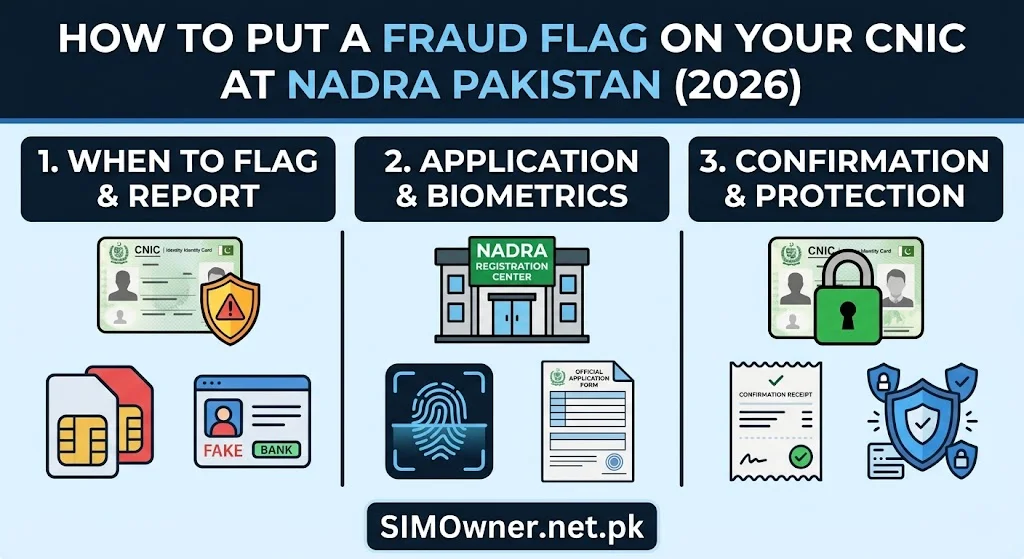
A NADRA fraud flag — technically a “complaint annotation” or “fraud alert” on your CNIC record — is one of the most powerful but least known protective measures available to Pakistani citizens. When properly placed, it alerts every PTA-connected system and NADRA-integrated service that your CNIC has been flagged for fraud risk, triggering enhanced verification requirements for any registration or transaction involving it.
This guide explains exactly what a NADRA fraud flag is, what it does and does not do, how to place one, the supporting actions that maximize its effectiveness, and how to verify it is working. Check your current SIM status at SimOwner.net.pk before and after placing the fraud flag — comparing before/after states confirms the flag’s impact.
What Is a NADRA Fraud Flag?
A NADRA fraud flag is an annotation placed on your CNIC record in NADRA’s central database indicating that the CNIC has been reported as misused or is at risk of misuse. The flag does not cancel your CNIC or block legitimate use — it adds a layer of scrutiny to any system query involving your CNIC.
What a Fraud Flag Does
In PTA’s SVMS (SIM registration system): When a franchise queries your CNIC for SIM registration, the SVMS returns the fraud flag indicator. This alerts the franchise agent that enhanced verification is required — the agent cannot simply complete the registration without supervisor approval or additional documentation review.
In NADRA-integrated systems: Government and commercial systems that query NADRA for CNIC verification receive the fraud flag status — triggering their own enhanced verification protocols.
Creates an audit trail: Every query against a flagged CNIC is logged with heightened detail — making post-fraud investigation easier and deterring criminals who know flagged CNICs generate more scrutiny.
What a Fraud Flag Does NOT Do
Does not cancel your CNIC: Your CNIC remains valid for all legitimate purposes. You can still open bank accounts, register SIMs with proper biometric verification, apply for passports, and use all government services.
Does not automatically block SIM registrations: The flag triggers enhanced verification requirements — it does not create an absolute block. A criminal at a corrupt franchise who bypasses verification entirely still bypasses the flag. The flag is most effective against semi-legitimate fraud attempts (where the criminal has your CNIC but not your fingerprint and relies on a careless agent).
Does not affect your existing SIMs: SIMs already registered on your CNIC before the flag are not affected.
Types of Fraud Flags Available
Pakistan’s fraud flag system operates at two levels:
Level 1 — Network Operator-Level Fraud Flag
This is the flag added to your account by each individual mobile network operator — Jazz, Zong, Telenor, Ufone. When you call each network’s customer service and request a “security note” or “fraud flag” on your account, they add an internal annotation requiring enhanced verification for any account changes.
This is the most immediately accessible protection. Call each network’s fraud line and request it today — no documents required beyond verbal CNIC verification.
| Network | Call | Request |
|---|---|---|
| Jazz | 111-225-111 | “Add security note requiring biometric for all account changes on CNIC [XXXXX-XXXXXXX-X]” |
| Zong | 310 | Same request |
| Telenor | 345 | Same request |
| Ufone | 333 | Same request |
Level 2 — NADRA-Level Fraud Annotation
This is the more powerful and more permanent flag — placed directly on your CNIC record in NADRA’s central database. It propagates across all NADRA-connected systems rather than being limited to individual operator accounts.
This requires a visit to NADRA — it cannot be done by phone.
How to Place a NADRA-Level Fraud Flag — Complete Process
Step 1 — Gather Your Evidence
Before visiting NADRA, compile documentation supporting your fraud flag request. While NADRA can accept requests based on your concern alone, supporting evidence significantly strengthens your case for a formal annotation:
Strong supporting documents:
- 668 response screenshot showing unauthorized SIM(s) on your CNIC
- FIA complaint reference number
- PTA complaint reference number
- Police FIR reference number and copy
- Network operator fraud case reference number
- Any financial records showing unauthorized transactions linked to your CNIC
The more evidence you bring, the more definitively NADRA annotates your record and the harder it is for the annotation to be removed later.
Step 2 — Visit a NADRA Regional Office
Important: Fraud flag requests are processed at NADRA Regional Offices, not at standard facilitation centers. Regional offices have the authority to add complaint annotations to CNIC records.
NADRA Regional Offices are located in:
- Islamabad (Federal Capital Territory)
- Lahore (Punjab)
- Karachi (Sindh)
- Peshawar (KPK)
- Quetta (Balochistan)
- Muzaffarabad (AJK)
- Gilgit (GB)
If you are not near a regional office city, the nearest NADRA Registration Centre can facilitate the request — though processing may require referral to the regional office.
NADRA helpline: 051-111-786-100 — call before visiting to confirm which facility handles fraud annotations in your area.
Step 3 — Submit the Fraud Flag Request
At the NADRA Regional Office:
- Approach the relevant counter (inquire at reception — it may be a specific window for complaints or special services)
- Present your original CNIC and evidence documents
- Complete NADRA’s formal complaint/annotation request form. Key information you will provide:
- Your CNIC number
- Nature of fraud/misuse experienced or feared
- Supporting evidence references (FIA number, PTA number, FIR number)
- Specific request: “CNIC fraud annotation to trigger enhanced verification for all system queries”
- Biometric verification — your fingerprint is captured to confirm you are the legitimate CNIC holder
- Your request is logged with a reference number — keep this
Step 4 — NADRA Processing
NADRA reviews your request and supporting evidence. Processing timeline:
Standard processing: 5–10 working days Urgent processing (with active fraud evidence): 2–5 working days — request urgent processing explicitly if you have FIA complaint or police FIR confirming active fraud
Step 5 — Confirmation
After processing:
- NADRA sends confirmation to your registered contact
- The fraud annotation is live in the central database
- PTA’s SVMS receives the updated flag status
Verifying the Fraud Flag Is Active
After NADRA confirms the flag is placed, verify it is working:
Verification Method 1 — NADRA Direct Confirmation
Visit any NADRA Registration Centre and ask: “Can you confirm my CNIC has a fraud annotation active?” The centre can query your CNIC status and confirm the annotation.
Verification Method 2 — Attempt a Test Registration
This is a practical (if slightly inconvenient) verification: visit a network operator’s service center and ask to register a new SIM on your CNIC. The enhanced verification requirement triggered by the fraud flag should be immediately apparent to the agent — they will note that your CNIC requires supervisor approval or additional steps.
Note: This test only reveals whether the flag is propagated to the network operator’s SVMS queries. The flag may be active in NADRA’s system before it fully propagates to all connected systems.
Verification Method 3 — 668 Monitoring
While 668 does not directly show fraud flag status, regular 668 monitoring after placing the flag confirms no new unauthorized SIMs are appearing — the practical evidence that the enhanced verification is deterring fraud attempts.
Monitor your CNIC’s complete SIM database picture at SimOwner.net.pk before and after placing the fraud flag — comparing the before/after state.
How Long Does a NADRA Fraud Flag Last?
The fraud annotation remains active until:
- You formally request its removal (with supporting documentation showing the fraud issue is resolved)
- NADRA’s periodic review process determines the annotation should be archived (this is rare and typically only happens if the annotation was placed in error)
Practical guidance: For most fraud victims, the annotation should remain permanently unless you have specific reason to remove it (e.g., you are confident the risk has fully passed and the enhanced verification is causing inconvenience).
Removing a Fraud Flag (When and How)
If you want to remove the fraud annotation in the future:
When removal is appropriate:
- Fraudster was prosecuted and the threat is definitively resolved
- The flag is causing significant legitimate service issues
- The original fraud concern has been fully addressed
Process:
- Visit NADRA Regional Office
- Submit a formal removal request with your original CNIC and biometric
- Provide documentation showing the fraud issue is resolved (FIA case closure, successful prosecution, etc.)
- NADRA processes the removal in 5–10 working days
Network-Level Fraud Flag — What to Say Exactly
While pursuing the NADRA-level flag (which takes days to process), immediately place network-level flags with all operators. This is same-day protection.
Exact language for each network call:
“I am [Your Name], CNIC [XXXXX-XXXXXXX-X]. I am calling to request a permanent security annotation on my account. Please add a note that: (1) any SIM replacement request on my CNIC must require in-person biometric at a main service center only — no franchise replacements; (2) any porting request requires in-person verification; (3) any account changes require supervisor approval. This is a fraud prevention measure. Please confirm this has been added and give me a reference number.”
Getting a reference number for each network’s fraud flag is essential — it is your proof the request was made if the flag is later absent.
The Complete Fraud Flag Strategy — All Layers
Maximum CNIC protection uses fraud flags at three layers simultaneously:
| Layer | What It Covers | How to Get It | Timeline |
|---|---|---|---|
| Jazz account flag | Jazz SIM changes | Call 111-225-111 | Same day |
| Zong account flag | Zong SIM changes | Call 310 | Same day |
| Telenor account flag | Telenor SIM changes | Call 345 | Same day |
| Ufone account flag | Ufone SIM changes | Call 333 | Same day |
| NADRA central flag | All NADRA-connected systems | Visit Regional Office | 5–10 days |
| Bank security flags | Banking and wallet accounts | Call each bank | Same day |
Implementing all six layers creates the most comprehensive protection available. The NADRA flag is the most powerful but takes the most time — start with network operator flags immediately while the NADRA process runs in parallel.
Bank-Level Fraud Flags — Often Overlooked
In addition to network and NADRA flags, place fraud alerts at your banks:
State Bank of Pakistan (SBP) has no central consumer fraud flag registry — each bank handles this independently. Contact each bank separately.
What to request at each bank:
- “Please add a fraud alert to my account — my CNIC has been involved in identity fraud”
- “Require in-person branch visit with biometric for any account changes”
- “Add verbal password requirement for phone banking”
- “Send notification for all transactions above Rs. 5,000”
Banks vary in what security measures they offer — ask the fraud department what is available and request all of them.
What Happens If Fraud Occurs AFTER the Flag Is Placed?
If a fraudulent SIM is registered despite a fraud flag being in place:
- This is evidence of verification bypass — the franchise or operator failed to honor the enhanced verification requirement
- Your PTA complaint is immediately stronger — you can explicitly state “A fraud flag was active on my CNIC per NADRA annotation [reference number] and PTA was notified — yet unauthorized registration still occurred, indicating operator verification failure”
- PTA’s enforcement obligation increases — failure to honor a fraud flag is a more serious regulatory violation than ordinary biometric bypass
- FIA investigation is stronger — circumventing a fraud flag is an aggravated form of identity crime
Document your fraud flag reference numbers specifically so you can cite them in any subsequent complaint.
The CNIC Information You Should Monitor Alongside the Flag
A fraud flag is most effective when combined with active monitoring. The CNIC information and protection resources at SimOwner.net.pk provide the framework for understanding what data is linked to your CNIC and how the fraud flag interacts with Pakistan’s SIM registration ecosystem.
Combined with the SimOwner.net.pk homepage verification tools — monthly 668 checks, network operator account reviews, and bank statement monitoring — the fraud flag becomes part of a layered defense that dramatically reduces your SIM and identity fraud risk.
Frequently Asked Questions
Q: Can I request a NADRA fraud flag online without visiting in person?
A: As of May 2026, NADRA’s fraud annotation process requires in-person biometric verification — online-only fraud flag placement is not available. This requirement exists specifically because the biometric confirmation proves you are the legitimate CNIC holder requesting the flag, preventing misuse of the flag process itself.
Q: Does a NADRA fraud flag affect my ability to travel or use my CNIC for legitimate purposes?
A: No — the fraud flag triggers enhanced verification, not denial. You can still use your CNIC for all legitimate purposes (SIM registration with biometric, bank accounts, passport, property transactions). The flag means the processing takes slightly longer due to additional verification steps — not that you are blocked from services.
Q: My CNIC has not been used for fraud yet — can I still request a fraud flag as a precaution? A: Yes. You do not need to have experienced fraud to request network-level security flags with operators — this is pure prevention. For NADRA-level annotation, you typically need to present some basis for the fraud concern (evidence your CNIC data was exposed in a breach, or that you have reason to believe fraud is imminent). The network operator flags are fully preventive and require no fraud evidence.
Q: If I renew my CNIC, does the fraud annotation transfer to the new card?
A: Yes — the fraud annotation is on your CNIC record in NADRA’s database, linked to your 13-digit CNIC number. Since that number does not change with renewal, the annotation persists through CNIC renewal. Confirm this with NADRA at the time of renewal.
Q: Can someone else remove my CNIC fraud flag without my knowledge?
A: Removing a NADRA fraud annotation requires in-person biometric verification of the CNIC holder — the same person who placed it. A criminal cannot remotely or fraudulently remove a properly placed fraud annotation without physically appearing at a NADRA office with the biometric credentials of the legitimate holder.
Q: How do I know if my CNIC fraud flag at NADRA has propagated to PTA’s system?
A: After NADRA processes the flag (5–10 days), call PTA’s helpline at 0800-55055 and ask whether a fraud annotation on CNIC [your number] is reflected in PTA’s SVMS. PTA can confirm whether the flag status is visible in the SIM registration system.
Summary: NADRA Fraud Flag — Complete Action Plan
Day 1 (Today):
- Call Jazz 111-225-111 — add security flag
- Call Zong 310 — add security flag
- Call Telenor 345 — add security flag
- Call Ufone 333 — add security flag
- Call each bank — add fraud alert
- Check 668 — document baseline SIM count
Within 1 week:
- Visit NADRA Regional Office with CNIC + evidence
- Submit fraud annotation request
- Get NADRA reference number
- File PTA complaint if unauthorized SIM exists
- File FIA complaint if fraud already occurred
After NADRA confirms flag (Day 10–15):
- Verify flag with NADRA directly
- Attempt test registration at operator to confirm propagation
- Continue monthly 668 monitoring
For Pakistan’s most comprehensive CNIC protection guidance and SIM verification tools, visit Sim Owner Details — Pakistan’s trusted identity security resource since 2015.
NADRA service processes and fraud flag procedures verified from NADRA official sources as of May 2026. SimOwner.net.pk is not affiliated with NADRA or any government entity.
Related Guides on SimOwner.net.pk:
- CNIC Data Breach Pakistan — Check Your Exposure
- How Criminals Register SIMs Using Your CNIC
- NADRA Services Complete Guide Pakistan
- Telenor SIM Fraud Reporting in Pakistan — Unauthorized SIM, Block Process, and Complete Complaint Guide (2026)
- How to Check SIM Information With CNIC Number in Pakistan — All Official Methods (2026)