
Last Verified: Jun 2026 | By SimOwner.net.pk Editorial Team — Pakistan’s SIM registration specialists since 2015
You have a SIM you do not use much — kept in a drawer as a backup, a number given to distant relatives years ago, or a work SIM from a previous job. You assume it will stay registered on your CNIC indefinitely. Then one day you need it, and it is gone — deactivated, with the number potentially reassigned to someone else.
Pakistan’s 180-day SIM inactivity rule is the regulatory provision that catches thousands of Pakistani mobile users every year — often at the worst possible moment. Understanding exactly how it works, what counts as “activity,” and how to protect SIMs you do not use regularly prevents unexpected disruptions and the security risks that come with inactivity.
Critically, SIM inactivity creates a specific fraud window that criminals exploit: an inactive SIM is one the legitimate owner clearly does not monitor, making fraudulent replacement requests less likely to be quickly detected. Check the current status of all SIMs on your CNIC at SimOwner.net.pk — identifying any approaching-inactivity SIMs is your first step.
What Is the 180-Day Inactivity Rule?
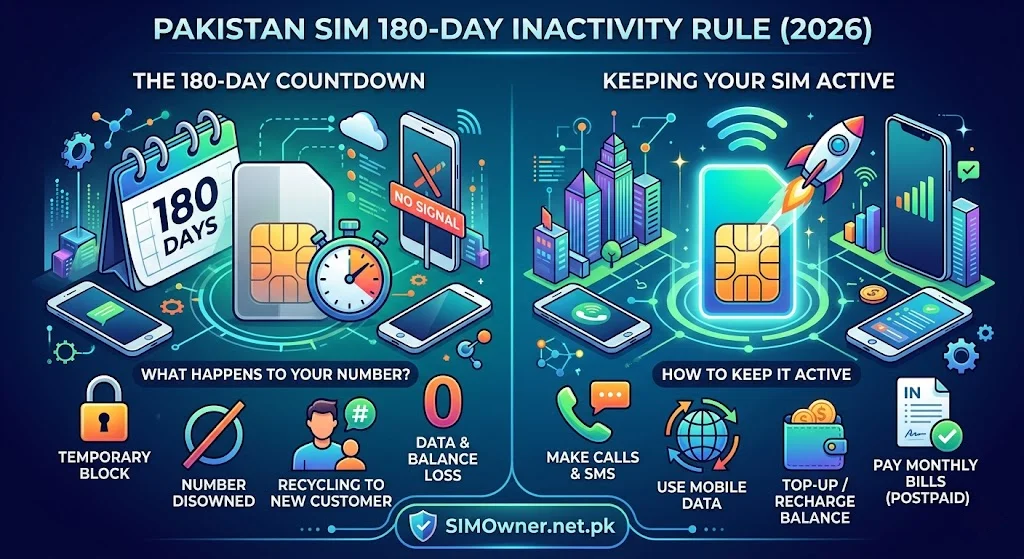
PTA’s subscriber management regulations require mobile network operators to deactivate SIMs that show no outgoing activity for a continuous period of 180 days (approximately 6 months). This rule applies to all prepaid SIMs across all Pakistani networks.
The Regulatory Basis
The 180-day rule is established in PTA’s Mobile Network Operators’ Licensing Conditions and referenced in subscriber management guidelines. The rule serves several purposes:
Number conservation: Pakistan has a finite pool of mobile numbers. Perpetually dormant SIMs occupying numbers prevent those numbers from being reassigned to active users.
Database hygiene: SVMS records for permanently inactive SIMs create management overhead for both operators and PTA’s regulatory systems.
Fraud reduction: Active monitoring of inactive SIM deactivation limits the window during which a dormant SIM can be exploited for fraud without the owner noticing.
What “Activity” Means
The 180-day clock resets with any outgoing activity from the SIM:
Activity that resets the 180-day clock:
- Any outgoing call (even 1 second, even unanswered)
- Any outgoing SMS (including SMS to 668, service codes, etc.)
- Any data session initiated from the SIM
- Any balance top-up or recharge
- Any USSD code dialed from the SIM (e.g.,
*123#)
Activity that does NOT reset the 180-day clock:
- Incoming calls received on the SIM
- Incoming SMS received on the SIM
- Your phone being powered on with the SIM installed but no outgoing action taken
This asymmetry surprises many users: receiving calls does not count as activity. You must initiate something outgoing.
The Three Stages of SIM Inactivity in Pakistan
Most Pakistani operators implement a three-stage process rather than immediate deactivation at 180 days:
Stage 1 — Warning Period (Day 150–180)
Around day 150, most operators send warning SMS messages to the inactive SIM: “Your SIM has been inactive for [X] days. Please make a call or send an SMS to keep your number active.”
Problem: If your SIM is in a drawer and you are not regularly checking it, you never see this warning. Many users discover their SIM was deactivated only when they try to use it.
Action: If you receive this warning — make an outgoing call or send any SMS immediately. 30 seconds of action resets the entire 180-day clock.
Stage 2 — Deactivation (Day 180)
At 180 days without outgoing activity, the operator deactivates the SIM. The SIM card itself remains physically functional but the number is disconnected from the network.
What “deactivated” means:
- Cannot make outgoing calls or SMS
- Data does not work
- Incoming calls receive “number not available” or “switched off” message
- The SIM still shows in your 668 check (it remains on your CNIC)
- Prepaid balance is typically lost at deactivation (or enters a freeze pending recovery)
Stage 3 — Number Reservation and Reassignment (Day 180–360)
After deactivation, operators typically hold the number in a reserved status for an additional period (varies by operator — typically 90–180 days) before returning it to the number pool for reassignment.
During this reservation period, you may still be able to recover your number at the operator’s service center by presenting your CNIC and paying any applicable recovery fee.
After the reservation period expires and the number is reassigned — your number is gone permanently.
Network-Specific Inactivity Rules
While all Pakistani networks follow PTA’s 180-day framework, implementation details vary:
Jazz Inactivity Rules
Deactivation trigger: 180 days no outgoing activity Warning: SMS typically sent at Day 150 and Day 170 Number reservation: Approximately 90 days post-deactivation Balance handling: Prepaid balance frozen at deactivation; potential recovery within reservation period JazzCash linkage: JazzCash wallet linked to the number has its own separate inactivity rules — wallet may remain accessible briefly after SIM deactivation
Jazz reactivation: If within reservation period, visit Jazz franchise with CNIC and request number recovery. Fee may apply.
Zong Inactivity Rules
Deactivation trigger: 180 days no outgoing activity Warning: SMS at Day 150 approximate Number reservation: Approximately 90–120 days post-deactivation Balance: Zong prepaid balance handling upon deactivation similar to Jazz Reactivation: Zong Customer Service Center with CNIC within reservation period
Telenor Inactivity Rules
Deactivation trigger: 180 days no outgoing activity Telenor specifics: Telenor has been noted for somewhat stricter enforcement — warnings may come earlier (Day 120–130 in some documented cases) Easypaisa: Telenor Easypaisa wallet has separate inactivity provisions — check Easypaisa terms for wallet-specific inactivity rules Reactivation: Telenor SSC within reservation period
Ufone Inactivity Rules
Deactivation trigger: 180 days no outgoing activity Warning: SMS at Day 150 approximate Number reservation: Approximately 90 days ONIC (Ufone MVNO): ONIC SIMs follow the same 180-day rule — managed through the ONIC app, which should send push notifications as warnings
SCO Inactivity Rules
SCO (Special Communications Organization) serves AJK and Gilgit-Baltistan with potentially different operational specifics. Call 051-111-726-726 to confirm current inactivity policy for SCO SIMs.
Special Cases — When the 180-Day Rule Has Different Implications
Overseas Pakistanis
For overseas Pakistanis with Pakistani SIMs:
A SIM in Pakistan receiving no outgoing activity because the owner is abroad will hit the 180-day threshold. Options:
Option 1 — Periodic activity via family: Ask a family member in Pakistan to borrow the SIM briefly once a month (make one outgoing call or SMS) to reset the clock.
Option 2 — International roaming: If you travel back to Pakistan and use the SIM internationally from abroad (some packages allow this), this counts as activity.
Option 3 — USSD via international roaming: Some operators allow USSD code dialing while in roaming — confirm with your operator whether a USSD dial counts as activity for inactivity purposes.
Option 4 — Deactivate and re-register when returning: If you will be abroad for more than 6 months without any way to maintain activity, formally deactivate the SIM (removes it from your 8-SIM count) and register a new one when you return.
Deceased Person’s SIM
A deceased person’s SIM will naturally hit the 180-day inactivity threshold. However, do not rely on the 180-day rule to automatically resolve the situation — the SIM remains on the deceased’s CNIC count and the number remains reservable for fraud purposes during the deactivation and reservation periods. The correct approach is formal deactivation through the network operator with death certificate documentation.
Backup SIMs You Do Not Use Daily
For SIMs kept as backups — a second network for coverage, an old number kept for contacts who might call:
Simple maintenance: Once a month, insert the backup SIM into a phone and dial any free USSD code (like *123# for Jazz balance check). This takes 10 seconds and resets the 180-day clock.
Calendar reminder: Set a monthly phone reminder specifically for “Check backup SIM — send *123# or make call.”
Business/Employee SIMs
Companies that issue employee SIMs need to have an inactivity management policy:
- When an employee goes on extended leave, who maintains their SIM’s activity?
- When an employee is dismissed, is their SIM promptly deactivated or does it sit inactive (fraud risk)?
- Does the company track SIM activity for all registered numbers?
These operational questions become security issues when ignored — inactive employee SIMs are a documented fraud vector.
The Security Risk of SIM Inactivity
Beyond losing your number, SIM inactivity creates a specific security vulnerability that criminals actively exploit:
Why Inactive SIMs Are Fraud Targets
No monitoring: If you are not using a SIM, you are not checking it — meaning a fraudulent replacement request could be processed and the new SIM used for weeks before you notice.
Lower suspicion at franchise: A franchise agent who sees a SIM has been inactive for months is less likely to question a replacement request — the story “I lost this old SIM” is more plausible for an inactive number.
Legitimate-looking inactivity: When you eventually do check your 668 results and see the SIM is still there, you may assume it is just inactive (which you expected) rather than investigating whether it was replaced with a fraudulent copy.
How criminals exploit it: A fraudulent SIM replacement on an inactive number gives the criminal a working SIM in your name that they can use for fraud accounts — linked to your CNIC, appearing legitimate in system checks — while you remain unaware.
The protection: Monitor the live status of all your SIMs at SimOwner.net.pk regularly, including backup and infrequently-used SIMs. Active monitoring eliminates the security window that inactivity creates.
Keeping SIMs Active — The Minimum Effort Method
For SIMs you want to keep but do not use regularly, the minimum effort maintenance method:
Monthly USSD Method (10 Seconds)
- Insert backup/inactive SIM into your phone (or swap in dual-SIM phone)
- Dial any USSD code:
*123#(Jazz),*310#(Zong),*345#(Telenor),*786#(Ufone) - The USSD query counts as outgoing activity — 180-day clock resets
Frequency needed: Once every 5 months is technically sufficient (before the 180-day mark). Once monthly eliminates any risk of accidentally missing the threshold.
Minimum Balance Top-Up Method
Adding any amount to your prepaid balance counts as activity. A Rs. 10–20 recharge:
- Keeps the SIM active
- Adds a small balance for emergencies
- Can be done through JazzCash/Easypaisa transfers to the number
SMS Method
Send any SMS from the SIM — including an SMS to 668 (which is useful anyway for your monthly SIM check). One outgoing SMS resets the 180-day clock entirely.
Verifying Your SIMs’ Active Status
Before any backup SIM hits inactivity, verify its status:
Check via 668: Does the SIM still appear in your 668 results? If a SIM you registered is no longer appearing, it may have been deactivated.
Call the number: Call your backup SIM from another phone. If it rings — active. If “not available” or similar — may be deactivated.
Check via SimOwner tools: The pak-sim-data verification at SimOwner.net.pk helps you understand the current status of all SIMs on your CNIC comprehensively.
Recovering a Deactivated SIM — Is It Still Possible?
If you discover a SIM has been deactivated due to inactivity:
Within the reservation period (typically up to 90 days post-deactivation):
- Visit the network’s service center
- Present your original CNIC
- Request number recovery/reactivation
- A fee may apply (Rs. 50–300 typical, confirm with operator)
- Biometric verification required
After the reservation period:
- The number may have been reassigned
- Recovery is not possible once reassigned
- Register a new SIM on your CNIC if needed
To prevent this situation: Track your SIMs’ activity dates. A simple note in your phone — “SIM 0311-XXXXXXX — last activity [date]” — tells you when each SIM needs attention.
Frequently Asked Questions
Q: Does receiving a call on my SIM count as activity to prevent deactivation?
A: No. Only outgoing activity resets the 180-day clock. Incoming calls, incoming SMS, and incoming data connections do not count. You must initiate outgoing activity — a call, SMS, data session, USSD dial, or top-up.
Q: My SIM was deactivated. Will it still show in my 668 check?
A: Yes — a deactivated SIM typically remains in your 668 results during the reservation period (the operator still holds the number). After the number is fully removed from your CNIC (deregistered), it disappears from 668.
Q: If my SIM is deactivated for inactivity, does it reduce my CNIC’s SIM count?
A: Yes — once fully deregistered after the reservation period, the SIM is removed from your CNIC count in PTA’s SVMS, freeing up one of your 8 slots.
Q: Can I keep a SIM active without a physical SIM card present (if the SIM is in storage)?
A: The SIM must be inserted in a powered phone to make outgoing calls or send SMS. If you store the SIM card physically, you need to periodically insert it in a phone to maintain activity. This is unavoidable — the activity must originate from the SIM itself.
Q: Does data usage on my eSIM count as activity?
A: Yes — any data session initiated through an eSIM profile counts as outgoing activity and resets the inactivity clock.
Q: My SIM operator says my balance was forfeited when the SIM was deactivated. Can I get it back?
A: Operators’ policies on prepaid balance at deactivation vary. Some operators allow balance recovery during the reservation period when you reactivate the number. Others treat deactivation as forfeiture. Check with your specific operator — if you paid for a significant balance, escalate the recovery request to a supervisor.
Summary: 180-Day Inactivity — Quick Reference
| Topic | Detail |
|---|---|
| Deactivation threshold | 180 days no outgoing activity |
| Activity types that reset clock | Outgoing call, SMS, data, USSD, top-up |
| Does NOT reset clock | Incoming calls or SMS |
| Warning SMS typical timing | Day 150 |
| Number reservation period | 90–180 days post-deactivation (varies) |
| Recovery possible | Yes — within reservation period, at service center |
| Minimum maintenance effort | Monthly USSD dial (10 seconds) |
| Security risk of inactivity | Fraud replacement window — monitor actively |
Keep your SIMs active with minimal effort — monthly USSD dials take seconds and eliminate both the loss-of-number risk and the fraud vulnerability that inactivity creates.
For complete SIM monitoring, registration verification, and Pakistan’s most comprehensive fraud prevention resources, visit Sim Owner Details — Pakistan’s trusted SIM information resource since 2015.
All inactivity rule details based on PTA regulations and operator policies as of May 2026. Specific operator handling may vary. SimOwner.net.pk is not affiliated with PTA or any network operator.
Related Guides on SimOwner.net.pk: