
Last Verified: Jun 2026 | By SimOwner.net.pk Editorial Team — Pakistan’s SIM fraud documentation specialists since 2015
Telenor Pakistan serves approximately 47 million subscribers — and despite having one of Pakistan’s stronger franchise verification compliance records, unauthorized SIM registrations on Telenor numbers do occur. Whether through a corrupt franchise agent, a SIM replacement bypass, or a weakness in the verification chain, Telenor SIM fraud follows the same pattern as fraud on any Pakistani network: your CNIC is used without your knowledge, a SIM is registered or replaced, and your number becomes a tool in someone else’s hands.
The response process matters enormously. Victims who report immediately, provide complete evidence, and use all three complaint channels simultaneously (Telenor + FIA + PTA) achieve significantly better outcomes — faster SIM deactivation, stronger fraud investigation, and higher bank reversal success rates — than victims who report days later through a single channel.
This guide gives you the complete Telenor fraud reporting process with exact contact information, what to say, what to request, and the full parallel action plan. Start with confirming your Telenor SIM situation at SimOwner.net.pk — know exactly what is on your CNIC before making your first call.
Confirming Telenor SIM Fraud — The 2-Minute Verification
668 Check
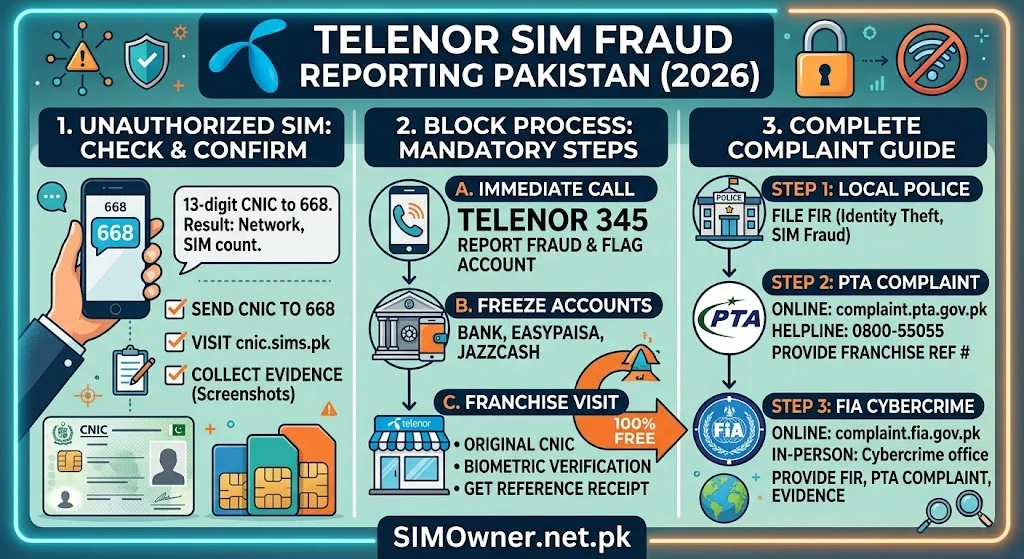
Send your CNIC number (without dashes) to 668 from any Pakistani mobile. The response lists all SIMs on your CNIC across all networks. Note every Telenor number in the response.
Telenor number prefixes: 0345, 0346, 0347, 0348
Cross-reference these with Telenor numbers you actually registered. Any unrecognized number is potentially fraudulent.
Important: 668 shows currently registered SIMs. If a fraudulent SIM was registered and then quickly deactivated, it may no longer appear. But if it is still active — it appears here.
Live SIM Status Check
Beyond the 668 check, monitor ongoing changes to your CNIC’s SIM registrations using the SimOwner.net.pk live tracker tools. This is particularly useful in the days following a fraud report — confirming the deactivation was processed and no new unauthorized SIMs appear.
Telenor Fraud Reporting — All Official Channels
Channel 1 — Telenor Helpline (Fastest Response)
Telenor Customer Service: Dial 345 from any Telenor number From non-Telenor phone: Dial 0345-7777345 Available: 24 hours, 7 days a week
Script for your call:
“I need to report a SIM fraud. A Telenor SIM with number [0345-XXXXXXX] has been registered or replaced on my CNIC [XXXXX-XXXXXXX-X] without my authorization. I want to speak with the fraud department. Please do not transfer me to general customer service — this is a fraud case requiring immediate action.”
Why specify “fraud department”: Telenor’s fraud team has authority to access registration records, initiate immediate deactivation, and flag accounts — powers that general customer service agents do not have.
What to have ready before calling:
| Information | Why Needed |
|---|---|
| Your CNIC number | Primary identity verification |
| Fraudulent Telenor number | Specific SIM to investigate |
| Your own verified Telenor number (if any) | Confirms your legitimate account |
| 668 response details | Evidence of unauthorized registration |
| Discovery date | Establishes investigation timeline |
| FIA complaint number (if already filed) | Accelerates Telenor’s cooperation |
What to specifically request from Telenor fraud agent:
- Immediate deactivation of the fraudulent SIM
- Fraud flag on your CNIC — requiring enhanced in-person biometric for any future changes
- Registration details — when registered, at which SSC or franchise, whether MBVS was completed
- A formal fraud case reference number — mandatory before ending the call
Channel 2 — Telenor Sales & Service Center (In-Person)
For comprehensive fraud reporting with biometric confirmation — visit a Telenor Sales & Service Center (SSC), not a small franchise agent.
Why in-person is stronger for fraud cases:
- Your biometric (fingerprint via NADRA MBVS) confirms you are the legitimate CNIC holder — stronger verification than phone-based
- The SSC manager can access more detailed registration records than phone agents
- Written documentation is created — a physical receipt of your fraud report
- You can directly request CCTV review reference if the fraud occurred at that SSC
Documents to bring:
- Original CNIC
- 668 response (screenshot printed or on phone)
- FIA complaint reference number (if filed)
- Any financial evidence (transaction records showing unauthorized activity)
Find nearest Telenor SSC: telenor.com.pk/find-a-store — use “Sales & Service Center” filter specifically.
Channel 3 — My Telenor App (Supplementary)
The My Telenor app does not have a dedicated fraud reporting function, but you can:
- View your account details to confirm the registered information Telenor has on file
- Check for any account changes you did not make
- Contact Telenor support through the app chat feature
The app is supplementary — use helpline or SSC as your primary reporting channel for fraud.
What Telenor’s Fraud Team Does After Your Report
Understanding Telenor’s internal investigation process helps you set realistic expectations and know when to escalate:
Hours 0–6: Initial Report Processing
Telenor fraud agent logs the complaint. Initial verification confirms you are the CNIC holder. The fraudulent SIM is flagged for priority review.
Hours 6–24: Registration Record Review
Telenor’s fraud team pulls the registration record for the flagged number. They check:
From their own systems:
- Registration date and time
- Which SSC or franchise outlet processed the registration (outlet ID)
- Which employee terminal processed it
- NADRA MBVS verification result record — did the system receive a “Verified” response?
From NADRA MBVS logs (via authorized query):
- Whether a biometric query was actually sent for this registration
- Whether the returned result was authentic or potentially manipulated
CDR (Call Detail Records):
- How has the fraudulent SIM been used since registration?
- What numbers has it called?
- What data has it used?
This usage data is particularly valuable for FIA’s investigation — it provides leads on the criminal’s activities and associates.
Hours 24–48: Action and Notification
Based on their review:
If fraud confirmed: SIM deactivated, fraud flag placed on your CNIC in Telenor’s system, compliance notification sent to the relevant franchise, fraud agent calls or messages you with case update.
If investigation ongoing: Telenor fraud agent informs you of the delay and provides an updated timeline.
Franchise action: Telenor’s compliance team initiates a separate investigation at the franchise level — reviewing the employee who processed the registration, checking other recent registrations from that outlet, potentially suspending the franchise pending investigation.
Parallel Actions — File All Three Simultaneously
Telenor’s action alone is necessary but not sufficient. File these simultaneously:
FIA Cybercrime Complaint
File at: complaint.fia.gov.pk
For Telenor-specific fraud, include:
- Telenor fraud case reference number
- The fraudulent Telenor number
- 668 screenshot attached
- Financial impact (if Easypaisa or banking OTP was affected)
- PECA 2016 Section 16 explicitly cited
Why FIA matters beyond Telenor’s action: Telenor deactivates the SIM. FIA prosecutes the criminal. Without an FIA complaint, the fraudster faces no criminal consequences and continues targeting other Pakistanis.
PTA Regulatory Complaint
File at: complaint.pta.gov.pk
Telenor-specific framing: “Telenor Pakistan failed to enforce mandatory biometric verification (NADRA MBVS) for a SIM registration on my CNIC, enabling unauthorized SIM registration in violation of PTA’s Subscriber Registration Regulations.”
PTA can impose financial penalties on Telenor for the verification failure and direct enhanced compliance auditing of the relevant franchise.
Police FIR
At your local police station under PECA 2016 Section 16
Bring: 668 screenshot, Telenor fraud case reference, FIA complaint reference, original CNIC.
The FIR is required for formal bank reversal requests and creates the local criminal record.
Telenor and Easypaisa — The Financial Risk Connection
Telenor owns Easypaisa — Pakistan’s second-largest mobile wallet. This creates an important fraud intersection: a fraudulent Telenor SIM can directly impact Easypaisa wallet access.
If the Fraudulent Telenor SIM Is Linked to Easypaisa
When your legitimate Telenor number had an Easypaisa wallet associated with it:
- A SIM swap (replacing your SIM with a fraudulent one) enables the criminal to receive Easypaisa OTPs
- The criminal can potentially withdraw your Easypaisa balance or transfer funds out
Action: Call Easypaisa immediately at 0311-1234-125 when you discover Telenor fraud. Do not wait for the Telenor fraud report to be processed.
Tell Easypaisa: “My Telenor SIM linked to my Easypaisa wallet has been fraudulently swapped or replaced. Please freeze my Easypaisa account immediately. My registered number is [your Telenor number]. My CNIC is [XXXXX-XXXXXXX-X].”
If the Fraudulent Telenor SIM Is a New Number (Not Your Existing Number)
A new unauthorized Telenor SIM registered on your CNIC (not replacing your existing number) does not directly access your existing Easypaisa wallet. However:
- The criminal may try to open a new Easypaisa wallet on the unauthorized number in your name
- Monitor your Easypaisa account for any unfamiliar linked numbers
Evidence Checklist — Complete Package for All Complaints
Compile this evidence package before filing any complaint:
Primary evidence:
- 668 response screenshot (with timestamp visible)
- Telenor fraud case reference number (from helpline call)
- Screenshot or print of the My Telenor app account summary
Supporting evidence:
- Financial transaction records if Easypaisa or banking was affected
- WhatsApp/SMS records showing any unusual communications during the fraud period
- Timeline document — when service disrupted (if applicable), when you discovered the fraud
For police FIR:
- All above documents + your original CNIC
- FIA complaint reference number
Telenor SIM Fraud — Common Specific Scenarios
Scenario: Your Telenor Number Lost Service
If your own existing Telenor number suddenly shows “No Service”:
- Call 345 from another phone immediately
- Ask if a SIM replacement was processed on your number recently
- If yes and you did not request it — report as fraud immediately
- Request immediate re-activation of your original SIM
This is the SIM swap variant — your number was replaced. Speed of response is critical.
Scenario: 668 Shows Telenor Number You Never Registered
A new unauthorized Telenor number is active on your CNIC alongside your legitimate SIMs:
- Confirm via 668 which Telenor prefix (0345/0346/0347/0348) and full number
- Call 345 — report unauthorized SIM registration
- Request deactivation of the specific unauthorized number
- Your legitimate Telenor number(s) are not affected
Scenario: Telenor Postpaid Account Fraud
If the fraudulent SIM is a postpaid SIM registered on your CNIC:
- Telenor may attempt to bill the postpaid charges to your CNIC
- Explicitly state in your fraud report that you did not authorize any postpaid account
- Request Telenor confirm in writing that you have zero liability for the fraudulent postpaid account
- If Telenor attempts billing — file PTA complaint specifically about fraudulent billing
Post-Fraud Account Security at Telenor
After the fraud is resolved:
Confirm fraud flag is active: Call 345 or visit SSC — confirm a security note is on your account requiring in-person biometric for any future SIM changes.
Add verbal password: Request Telenor to add a verbal password to your account. Any future account changes require verifying this password. Ask specifically: “Please add a verbal security password to my account. No account changes should be processed without this password being provided.”
Check sim-info tools at SimOwner.net.pk periodically to confirm Telenor SIM count on your CNIC remains at the expected level.
Enable My Telenor app notifications: Set up account change alerts if available in the current app version — any account modification triggers a notification.
Frequently Asked Questions
Q: Telenor 345 helpline says they cannot find any fraud on my account. But 668 shows an unauthorized SIM. What do I do?
A: This discrepancy — 668 (PTA’s SVMS) showing a SIM that Telenor claims is not in their system — is a serious issue. Include this discrepancy explicitly in your PTA complaint: “PTA’s SVMS shows SIM [number] registered on CNIC [XXXXX-XXXXXXX-X] under Telenor, but Telenor’s customer service denies knowledge of this registration.” PTA can investigate the mismatch between SVMS data and Telenor’s internal records.
Q: Can Telenor tell me who is currently using the fraudulent SIM?
A: Telenor has CDRs showing usage patterns but does not disclose personal information about the SIM user (the criminal) directly to you. This information goes to FIA as part of a formal criminal investigation. FIA with proper orders can access and use this information to identify and prosecute.
Q: I reported Telenor SIM fraud 3 days ago but the SIM is still active on 668. Why?
A: Some delay between Telenor’s system deactivation and PTA’s SVMS update (which 668 queries) is normal — typically 2–4 hours. A 3-day gap, however, suggests either the deactivation was not processed or there is a system update issue. Call 345, provide your fraud case reference, and specifically ask for the current deactivation status. If Telenor confirms deactivation but 668 still shows it — escalate to PTA.
Q: What if the franchise where the fraud occurred is now closed?
A: Franchise closure does not stop the investigation. PTA and Telenor maintain registration records electronically — the franchise outlet ID in the registration record is traceable even if the physical location closed. FIA can still pursue the investigation through the operator’s electronic records.
Q: My Telenor SIM fraud also affected my internet banking — what specifically should I tell the bank?
A: Tell your bank: “My Telenor SIM [your number] was fraudulently replaced without my consent on approximately [date]. During the period [date to date], OTPs sent to this number were received by the criminal, not me. Any transactions authorized by OTP during this period are unauthorized. I have filed FIA complaint [reference number] and Telenor fraud case [reference number] confirming this fraud.” The FIA and Telenor references are critical for the bank’s internal fraud investigation.
Complete Telenor Fraud Action Summary
| Time | Action | Contact |
|---|---|---|
| Immediately | Call Telenor fraud | 345 / 0345-7777345 |
| Immediately | Freeze Easypaisa (if linked) | 0311-1234-125 |
| Within 1 hour | File FIA complaint | complaint.fia.gov.pk |
| Within 2 hours | File PTA complaint | complaint.pta.gov.pk |
| Within 24 hours | File police FIR | Local police station |
| 48 hours later | Verify deactivation via 668 | SMS CNIC to 668 |
| In person (soon) | Add fraud flag permanently | Nearest Telenor SSC |
| Monthly | Monitor SIM status | SimOwner.net.pk |
For Pakistan’s most comprehensive SIM fraud prevention, network-specific guides, and verification tools, visit SimOwner.net.pk — Pakistan’s trusted SIM information resource since 2015.
All Telenor helpline numbers and processes verified as of May 2026. SimOwner.net.pk is not affiliated with Telenor Pakistan or any network operator.
Related Guides on SimOwner.net.pk:
- How Criminals Register SIMs Using Your CNIC
- Telenor SIM Ownership Transfer — Complete Guide
- FIA Cybercrime Wing Pakistan — Complete Guide
- Zong SIM Fraud Reporting in Pakistan — Official Channels, Helpline, and Complete Complaint Process (2026)
- How to Put a Fraud Flag on Your CNIC at NADRA Pakistan — Step-by-Step Guide (2026)